Thursday, July 23, 2009

IGI No Longer Being Updated


Picture courtesy of....
http://freepages.genealogy.rootsweb.ancestry.com/~airliegenealogy/ancestors.htm

Hi everyone. I just found out (as I was doing a search for an ancestor on the IGI) that the IGI no longer updates its files. If you want to see what work has been done on an individual, you now use new.familysearch.org

Here is the official statement from the church:


Document ID: 107347 All temples will record ordinances using the new FamilySearch System July 2009By the end of July 2009, all temples (with the exception of 5 of the Asia temples; Tokyo, Fukuoka, Taipei, Hong Kong and Seoul) will record ordinances using a new ordinance recording system. Completed ordinances will no longer be updated in the International Genealogical Index (IGI) by temples on the new system. Because of this, members should meet with a family history consultant or visit a family history center to view and verify the latest ordinance information. Family history consultants and family history center staff have the information necessary to help members view completed ordinances using the new FamilySearch system.
After verifying that an ancestor needs temple ordinances, members may continue to prepare ancestral names for temple ordinances using the TempleReady process. After a TempleReady submission file has been created, the family history center staff can assist the patron to create and print a Family Ordinance Request form that will be taken to the temple, and used by the temple staff to print temple name cards.
Family history consultants and center staff may also use a helper function in the new FamilySearch to prepare ancestors’ names for temple ordinances, print a Family Ordinance Request, and bypass the need to use the TempleReady process.

https://help.familysearch.org/publishing/590/107347_f.SAL_Member.html#home

Thursday, May 7, 2009

NEW program the Church has developed for you!

This is in the pilot stage which means they are still tweaking it and welcome your comments and suggestions.
Go to familysearchlabs.org (do not use www. in front of it)

The first item is Record Search. You can get the 1900 census on this! Just type in the name of an ancestor you think may be on the 1900 US Federal census, type in the name of the state...hit Search. If your ancetor is indeed on that census up will come your ancestor's name and on this page you can click on his name and then click on View Image . It will show you the actual handwritten page of the census. It will be small so you need to use the "zoom" button. Near the upper right hand corner will be the "zoom" button to click on and drag so you can see an enlarged image of this record.
Play around on this site..it is fun and has lots of other features.

Now....the next item on the home page of familysearchlabs.org is
Family Tree. To get in this you need the same username and password you chose when you registered for newfamilysearch.org.

This will have all the information you have viewed or entered, into your new.familysearch.org account..only this is more user friendly. Any information you add on this familysearchlabs.org site will automatically go into your new.familysearch.org account. You can even prepare Temple Submission Requests (and print them) on this new site...I like this new site becuase it is a bit easier to navigate...try it out...explore. This is why computers were invented in the first place: to speed up the work we need to do.


NOTE: You will need Adobe Flash Player 10 for this...which you can upload free...you will be directed on how to do this.

NOW...if you never have registered yet for new.familysearch.org
account, this is how you do it (AND YOU NEED TO DO IT) :

Obtain your church memebership number (on your temple recommend or from your clerk) and you confirmation date. Also..you need to have an email address.

Go to new.familysearch.org (do not use www. in front of it)

Click on Register for the new FamilySearch and follow the instructions. You will be asked to choose a username and password


Note: Write down your username and password in a place you will remember...in case you forget it. This is important. If you do forget it and the place you put it...thank goodness you have an email address..the church will send it to you. The church will have your email address becuase you will have given it to them when you registered for new.familysearch.org. The church will not lose your email address. What a relief!

But let me say this: If you USE these wonderful programs regularly, your username and passowrd will not be forgotten easily. Try to go to the sites several times a week. It takes time to learn and process and get good at navigating all the features on these sites.

Sunday, March 29, 2009

Mormon History Site


This is Joseph Smith's Red Brick Store where the Relief Society was first organized March 17, 1842 in Nauvoo, Illinois. Got it from a cool site I just discovered today.

Cut and paste the following address into your address bar and see what a great site this is..you get a map of the US and can click on different areas of the map and get pictures, stories, descriptions of what happened there and when.


http://www.mormonhistoricsitesregistry.org/USA


I will put a link on the side for this, too.

Sunday, January 25, 2009

Dream Come True-1900 Census Online Free


Wow! A new wonderful thing has happened. The church has digitalized the entire US 1900 census and has made it available to anyone free.

The 1900 census is one of the best censuses around! You can access it free online by going to familysearch.org and typing in a name of you ancestor that might be in the census. Go..explore..you will be amazed!

Not Sure How to Use the newfamilysearch.org site?


1. Remember that there is NOT a www. before the address.
go to new.familysearch.org


2. To register, you need your confirmation date, and your church membership number
Ask ward clerk if you do not know your confirmation date.
Your membership number is on your temple recommend. Or ask your ward clerk.

3. Create a sign in name and password. Write it down somehwere so you do not forget it. Oh, yes, you also need an email address for yourself.

4. OK..if you did all the above..YOU'RE IN !

5. Now..you may ask..how do I use this? Take the course! It is excellent!

OK...after you sign in. You will see where you can have a 10 minute overview or you can skip it. You should watch it at least once. It is 10 minutes.

Otherwise, click SKIP OVERVIEW.
Click on Help Center
Then..click on Training in Resources tab near the top of the page.
Then...click on Training & Resources.
Then...click on E Learning Courses....and begin.

You do not have to do it all at once..it is a 4-5 hour course. Very well done. Little quizzes and practices along the way. You even can print out a certificate at the end of the course, that stares you completed the course.

Your computer will remember where you left off whenever you log off and then sign in again. It is fun..and you really need to do it so you will feel confident with this new program. Call me if you have questions! Joan Hulihan 760 241 1420

Sunday, July 20, 2008

Step Six: Register on new.familysearch.org


This is for LDS church members. Our Redlands Temple district has rolled out the new family search program that will enable you to post and preserve all your family history data on their site and submit names to the temple from your home computer.


There has been some confusion about getting to the church's new site.

Here is the problem:

There is no www in the address !

If you do use a www in front of new.familysearch.org you will be directed to a site that has nothing to with the church's site.


I will give you the correct address.

Clear your address bar and

just type in new.familysearch.org


You could also type in

http://new.familysearch.org


or


https://new.familysearch.org


When you see the home page with President Monson's picture on it, you know you are at the right place.


AGAIN...DO NOT USE WWW


OK...once you get on the site, please register! You will have a username and password, then, to access it.

You will need to get your church membership number (from your temple recommend or the ward clerk) and you confirmation date.

OK, that's your assignment: Register at new.familysearch.org

Step Five: Make a Paper Packet of Your First Five Generations


Hello everyone! Just got back from a 16 day vacation to Maryland, Missouri, and Wisconsin. I also was on vacation from the computer so it is now time to resume this project!

My project is to help you become familiar with and competent in family history work.

So far I have introduced you to the 2 main charts:

the pedigree sheet

and the family group record.


I have encouraged you to print off copies of these charts
and fill them in with your own handrwiting. Do this if you are just starting
to do family history work for the first time and have not had anyone in your family ever submit anything to the church's Ancestral File.

Some of you already have pedigrees and family group
records on the Ancestral File on the church's original family history site which is at www.familysearch.org . If you know that this information is correct, you can print the pedigrees and family group charts and compile them in a neat paper stack and clip them together. Do this for the first 5 generations.

Why?

Because you will have a manageable stack of papers with information that is, for the most part, verifiable. You will use this stack when you are doing research to verify the information or to fill in the empty spaces on the charts.


Here is another reason to have your 1st 5 generations on paper....

So it will be easier to transpose the information to computer programs.
(Such as PAF or the new family search program)
I have seen too many people riffle through bags of loose papers while
trying to input this data into the computer. It is frustrating and time
comsuming. When you have at least your first 5 generations all on
paper, it seems (at least to me) very user friendly. I am a paper person.

I realize many of you prefer to use your black-berries or palm pilots, etc. As the song goes, "To Each His Own".

But when I am on the phone with Great Uncle Chester, I will be using
paper and pencil to record any names,dates and places he gives me.
I will have my family group sheets and pedigree chart right there
with me by the phone and write in them as he speaks. If he is not
sure, I will put a question mark by it. I will also make a footnote
that this information was given to me by Chester and the
date he gave it to me. Some of you will prefer to whip out
your Palm Pilot, etc. and type in the information as you
receive it direct from the voice on the telephone. That is fine.

But I love my stack of papers all neatly held together with a binder
clip. I love looking through the pages and reading the information
and becoming more familiar with my people each time I do it.
I have used my "packet" to enter the information onto the new family
since I never did (nor did anyone in my family) submit anything to the
church's Ancestral File.

(I will explain Ancestral File later but suffice it to say that the new family search program aims to absorb the contents of Ancestral File as members examine and clean up the information about their families
who have passed away.

OK...now.....Here is a project for you.

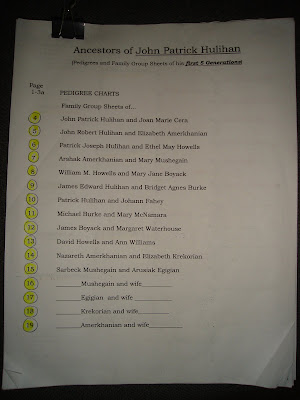
Make a packet of papers for yourself that include a 5 generation pedigree chart and enough family group charts to accomodate the couples listed on the pedigree chart.
You will need at least 16 (and more if a direct ancestor had more than one wife.)

Number the pages. I like to put the number in the right hand corner, with a circle around it, and then color it with a yellow highlighter.

Make a cover sheet that lists each page (see photo above...I made this packet for my husband )by page number...and the contents of the page. If you circle the number and highlight it in a color, it is more reader friendly.

Now when you start doing family history work in earnest, this stack (which can easily be carried around) will serve you well! It will make your experience on the new family search site much more enjoyable.


Have I explained what 5 generations means?

You are generation one, the starting point in your family history. You will go backward in time now...
Your parents are the second generation back.
Your grandparents are the third generation back.
Your great granparents are the fourth generation back.
Your great great grandparents are the fifth generation back.